
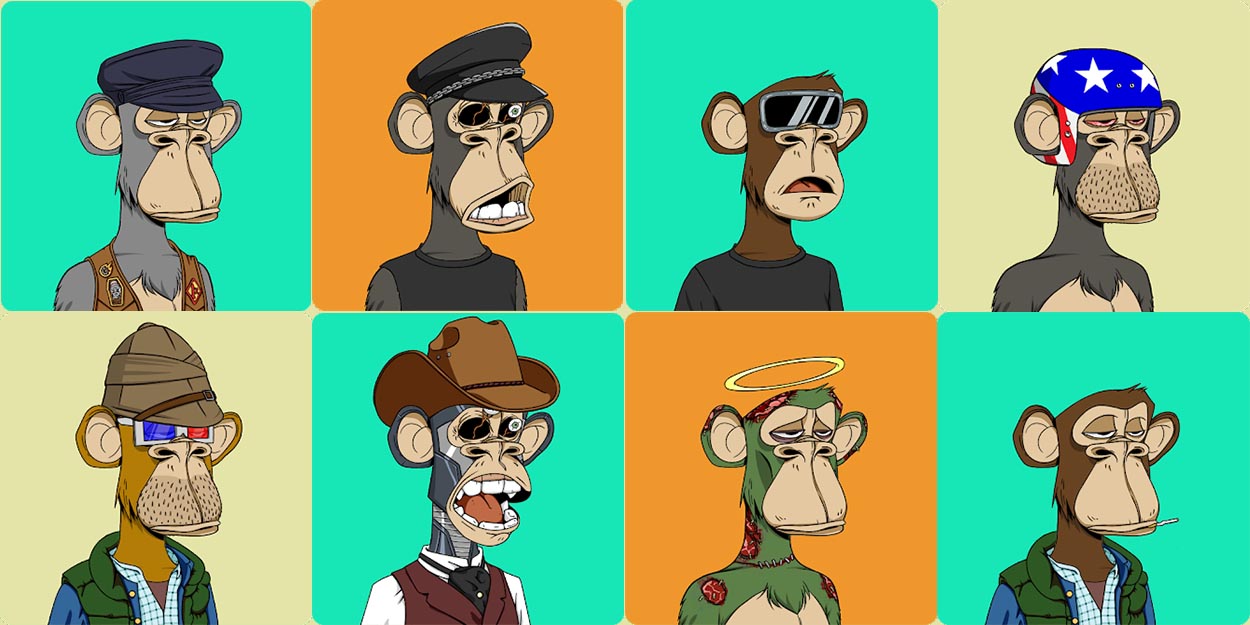
Assets are NFTs that belongs to a collection, they can be images, videos, 3d objects and they can have metadata associated to it, its what we call properties. Examples of image assets are in the picture below from collection bored apes.
Category
An asset should have a category associated to it. Categories are used to organize NFTs into specific groups before the deployment, this value won't be accessible on the blockchain. In order to create a category you can use the endpoint Assign category with specified values for specified assets with for example the request below:
{
    "assetIds": ["28a0947d-ec9a-487f-a32f-7cd0c44702cf", "322c8718-26dd-436a-9288-d61066e41934", "36d7c33a-4058-45da-9862-b3565bbf1e36"],
    "collectionId": "8b279b58-9f03-4cec-a272-cbfd63b1b29e",
    "category": "Legendary"
}
Properties
The properties are the ones that will be available to all users on blockchain, they are values that represent the NFT. We can see a NFT properties on marketplaces, for example for this NFT:

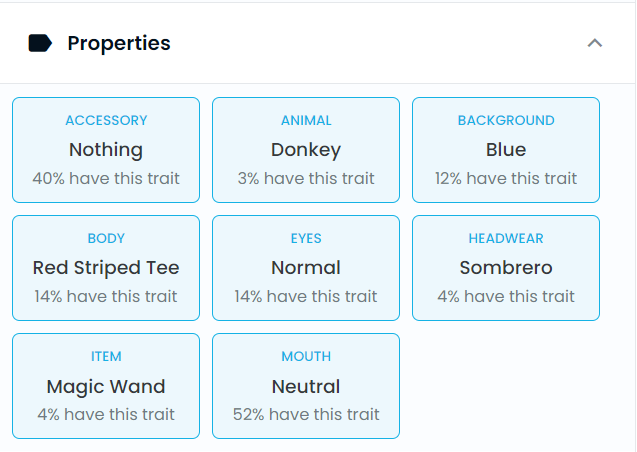
We can see from the properties and image that the property "ACCESSORY" with a value of "Nothing" means that the character does not have an accessory, the property "ANIMAL" with a value of "Donkey" means that the character is a donkey, and so on.
If you want to assign properties already created on "Create property with specified values for a collection" to Assets you should use the endpoint Assign property with specified values for specified assets :
{
     "collectionId": "afa15688-f40f-4f68-9357-59191e79e684",
     "property": "Background",
     "value": "Blue",
     "assetIds": ["1e861d1d-780d-4873-8acb-28133d601193", "2b827cac-2a29-4a2b-bd63-4933ffcf65ab"]
}